This is Day 12 of the Homebrew OS Advent Calendar 2018.
Introduction
I’ve been reading the xv6 textbook lately. It recommends using QEMU’s -s option for debugging. -s is shorthand for -gdb tcp::1234; with it, QEMU starts gdbserver on port 1234, and you can attach with target remote :1234 from gdb. It would be great to do the same when reading FreeBSD’s code. After some trial and error, it worked—here’s how I debugged the FreeBSD kernel with QEMU’s -s option.
Debug setup
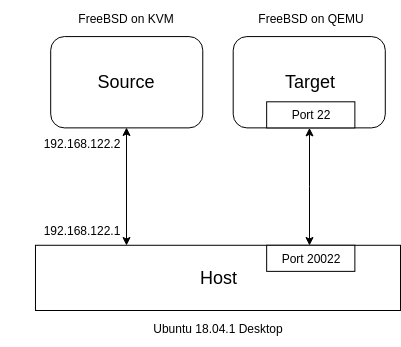
You need two FreeBSD instances:
| Role | OS | Virtualization | Name here |
|---|---|---|---|
| Debugger | FreeBSD 11.2 | KVM | Source |
| Being debugged | FreeBSD 11.2 | QEMU | Target |
| Host | Ubuntu 18.04.1 Desktop | × | Host |
I happened to use KVM for Source, but anything works. The kernel rebuild is done on Source.
On Host, port 20022 is forwarded to port 22 on Target. Host and Source can talk over 192.168.122.0/24. As long as Host and FreeBSD can reach each other, the exact setup doesn’t matter.
Steps
1. Install FreeBSD
Prepare Source and Target (install steps1 omitted). Use the same version/arch; I chose FreeBSD-11.2-RELEASE-amd64.
Before installing Target, run this on Host to set up image and forwarding. -redir tcp:20022::22 maps Host’s 20022 to Target’s 22.
$ qemu-img create -f qcow freebsd_debug.img 30G
$ qemu-system-x86_64 -m 4096 -hda freebsd_debug.img -boot c -cdrom FreeBSD-11.2-RELEASE-amd64-dvd1.iso -redir tcp:20022::22
Include /usr/src on Source.
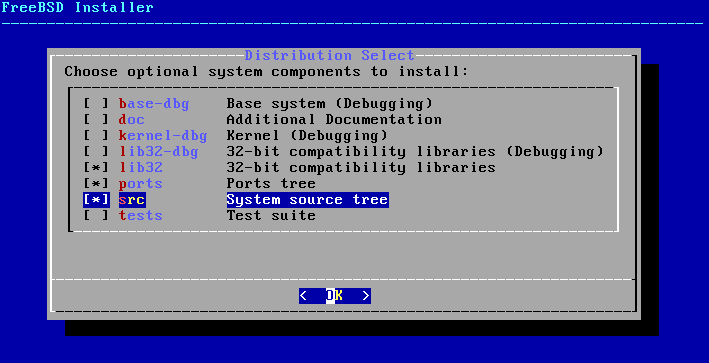
Boot both Source and Target.
2. Rebuild the kernel
Rebuild the Source kernel with debug info. Steps vary a bit by FreeBSD version; adapt accordingly. First copy the default config:
$ cd /usr/src/sys/amd64/conf
$ cp GENERIC MYKERNEL
Add these to MYKERNEL:
makeoptions DEBUG=-g
options KDB
options DDB
My MYKERNEL is on Gist; the lines are 24/83/85.
Build and install:
$ cd /usr/src
$ make buildkernel KERNCONF=MYKERNEL
$ make installkernel KERNCONF=MYKERNEL
make buildkernel takes time—coffee break—and reboot Source when done.
3. Transfer
Copy everything under /boot/kernel/ from Source to /boot/kernel/ on Target. From Host:
$ scp -r root@192.168.122.2:/boot/kernel .
$ scp -P 20022 kernel/* root@127.0.0.1:/boot/kernel
If you run strip -x on Host before the second command, symbols are removed and things look tidier:
$ du kernel -h
123M    kernel
$ sudo strip -x kernel/*.ko
$ sudo strip -x kernel/kernel
$ du kernel -h
117M    kernel
4. Reboot
Shut down Target. Boot it with -s to start gdbserver:
$ qemu-system-x86_64 -m 4096 -hda freebsd_debug.img -boot c -cdrom FreeBSD-11.2-RELEASE-amd64-dvd1.iso -redir tcp:20022::22 -sAdd -S if you want to debug from reset.
5. kgdb
kgdb is the kernel debugger. Start it on Source and attach to QEMU on Host; Target will pause. From here, debug as you like. To confirm it works, set a breakpoint on sys_mkdir and resume:
$ kgdb /boot/kernel/kernel
GNU gdb 6.1.1 [FreeBSD]
...
This GDB was configured as "amd64-marcel-freebsd"...
(kgdb) target remote 192.168.122.1:1234
...
(kgdb) b sys_mkdir
Breakpoint 1 at 0xffffffff80bdac14: file /usr/src/sys/kern/vfs_syscalls.c, line 3337.
(kgdb) c
Continuing.
Now run mkdir test on Target—it stops as expected. Success!
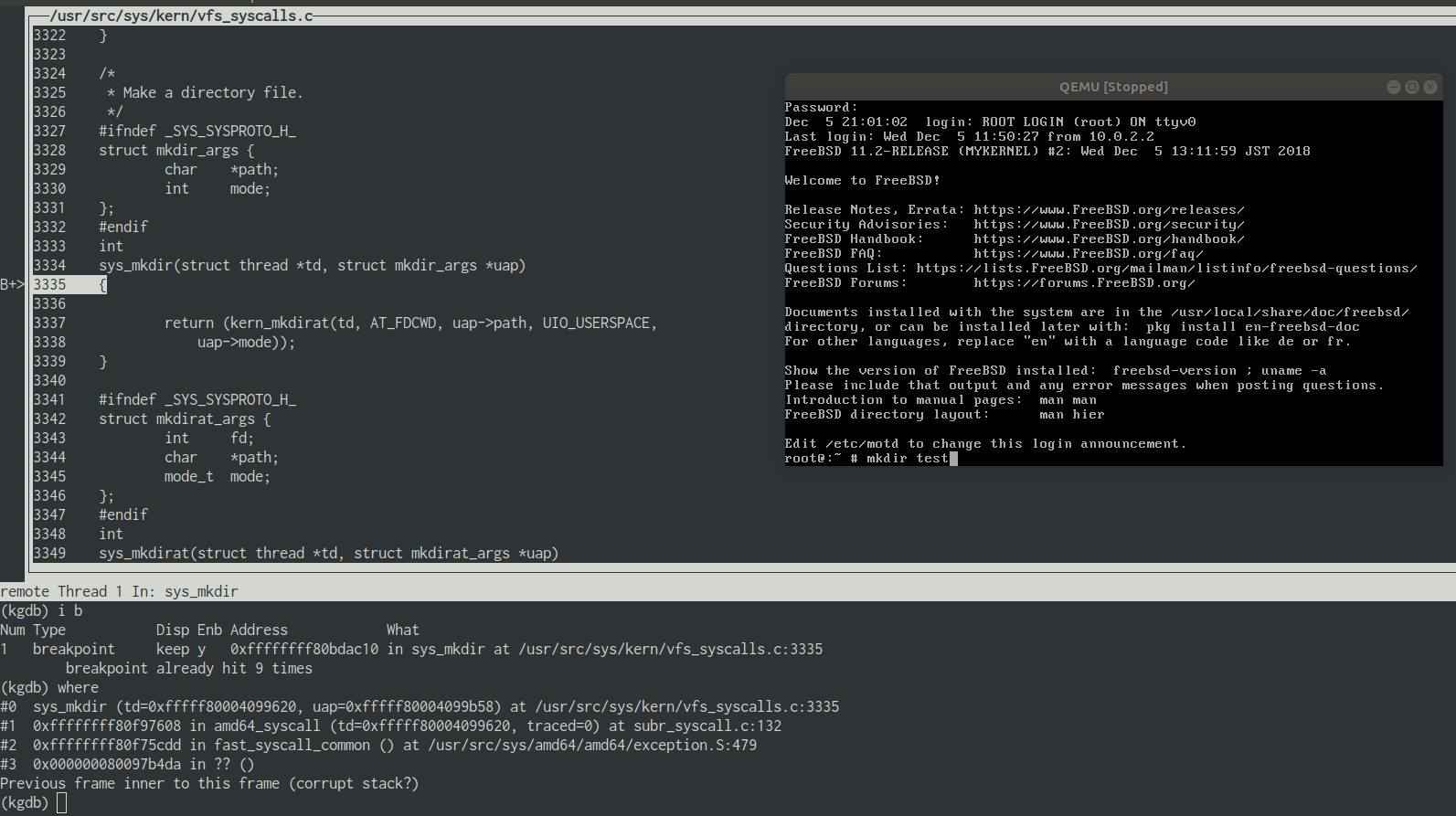
(Click to enlarge.) Even this small test shows how the system call path flows. Yay!
Wrap-up
Now I can read FreeBSD kernel code interactively. Debugging while watching the code is more fun than just staring at it. I think the “proper” way is to connect two machines over serial, but I tried using QEMU’s features. Please don’t ask why FreeBSD. Day 13 of the Advent calendar is garasubo’s “Rust on Arm Cortex-M 2018.” As a Rust fan I’m looking forward to it.